
2D Computer Animation
Animation
History of 2D Animation
Timeline
2D computer animation
2D vs 3D animation
Where is 2D animation used?
Types of 2D animation
Workflow
Things to keep in mind
- Animation
- Animation is the rapid display of a sequence of static images that creates the illusion of movement.
- To animate something means to give a character the "appearance of movement" using animation techniques.
- To create the aforementioned “appearance of movement,” an artist produces a sequence of images—whether drawn, painted, or created through other artistic methods—that vary slightly from one image to the next. When these images are presented sequentially, the viewer perceives an illusion of changing form and movement.
- History of 2D Animation
- 2D animation is one of the earliest forms of animation, with its origins dating back to the late 19th century. Traditionally, artists drew individual frames by hand, often using pencils, and then transferred the drawings onto transparent sheets of celluloid, commonly known as cells.
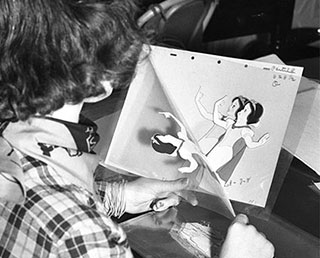
- The images were painted onto the cells, which were then photographed one frame at a time. When the photographs were projected in rapid succession, the slight differences between the individual frames created the illusion of movement.
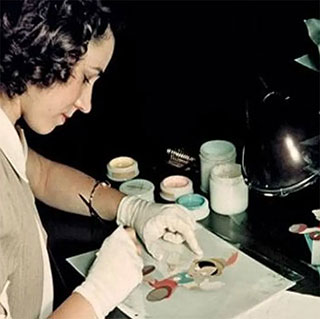
- Traditionally, hundreds—even thousands—of individual drawings might be created between the beginning and end of a scene. When these images are presented in rapid sequence, the slight differences between them are perceived as continuous motion. This labor-intensive process formed the foundation of traditional hand-drawn animation.
- Today, sophisticated computer software has made many aspects of 2D animation more efficient and accessible. Digital tools allow artists to create, modify, and organize animated images with greater ease while still preserving the expressive possibilities of drawing and illustration.
- As a result, 2D animation provides artists with a powerful medium for transforming ideas and imagination into visual experiences.
- 2D animation has evolved considerably since <Fantasmagorie> (1908), one of the earliest animated films, through the countless cartoons, television programs, films, and digital animations that followed.
- Despite the growing popularity of 3D animation, 2D animation continues to maintain its distinctive appeal. Its ability to transport viewers into imaginative worlds through stylized and expressive representations remains compelling.
- Although technological advances have made the once highly time-consuming process more convenient, the fundamental artistic principle of creating the illusion of movement through successive images remains at the heart of 2D animation.
- A Brief History Of Animation
- A Brief History Of Animation
- 2D animation is one of the earliest forms of animation, with its origins dating back to the late 19th century. Traditionally, artists drew individual frames by hand, often using pencils, and then transferred the drawings onto transparent sheets of celluloid, commonly known as cells.
- Timeline
- Pre-Cinema: The Illusion of Motion (1830s–1880s) Before film, inventors used mechanical devices to trick the eye into seeing movement from static images.
- Phenakistoscope (1833): The first device to demonstrate continuous movement using a spinning disc.
- Zoetrope (1834): A spinning drum with slits that created a moving loop of paper strips.
- Praxinoscope (1877): An improvement on the zoetrope using mirrors for a clearer image.
Phenakistoscope, Zoetrope, Praxinoscope
- Émile Reynaud: In 1877, he invented the praxinoscope, a device that used mirrors to project hand-painted images onto a screen, producing short animated films like "Pauvre Pierrot" (1892), considered the first 2D animated film.
<Pauvre Pierrot> (1892) Émile Reynaud
- Phenakistoscope (1833): The first device to demonstrate continuous movement using a spinning disc.
- Early Pioneers (1900s–1910s) Artists began using film to record sequential drawings, moving away from "trick films" to true storytelling.
- <Fantasmagorie> (1908): Created by Émile Cohl, this is considered the first animated film using traditional hand-drawn techniques. It consisted of 700 hand-drawn frames.
- <Gertie the Dinosaur> (1914): by Winsor McCay, his <Gertie the Dinosaur> demonstrated the potential of 2D animation, pioneering the use of key-framing by drawing key poses and then creating the "in-betweens".
- Cel Animation (1914): Patented by Earl Hurd and John Bray, this technique involved drawing characters on transparent celluloid sheets, allowing backgrounds to remain stationary and significantly reducing work.
- The Silent Era: Studios began to form, with Bray Studios being particularly successful, launching the careers of future cartoonists.
- <Fantasmagorie> (1908): Created by Émile Cohl, this is considered the first animated film using traditional hand-drawn techniques. It consisted of 700 hand-drawn frames.
- The Golden Age (1920s–1960s) This era saw 2D animation become a massive global industry, led by major American studios.
- Sound and Color: In 1928, Disney's <Steamboat Willie> popularized synchronized sound. This milestone film introduced synchronized sound to 2D animation and solidified Mickey Mouse's iconic status.
- In 1932, <Flowers and Trees> became the first full-color animated short.
- The First Feature: <Snow White and the Seven Dwarfs> (1937) was the first full-length animated feature film, utilizing the multiplane camera for realistic depth. This was a massive achievement that paved the way for future animated storytelling.
- Sound and Color: In 1928, Disney's <Steamboat Willie> popularized synchronized sound. This milestone film introduced synchronized sound to 2D animation and solidified Mickey Mouse's iconic status.
- The Rise of Television and Limited Animation (1950s–1980s) As the demand for TV content grew, studios developed "limited animation" to lower costs.
"Limited animation" is a cost-saving technique that reduces the number of drawings and frames needed for animation, making it ideal for TV, by reusing frames, animating parts separately (like just the mouth or arms), using simpler designs, and employing techniques like panning/zooming on still images, leading to choppier but often stylized motion, famously used by Hanna-Barbera Cartoons, Inc. (was an American animation studio and production company which operated from 1957 until its absorption into Warner Bros.)
- Hanna-Barbera (Cartoons, Inc): Shows like <The Flintstones> and <The Jetsons> used fewer drawings per second and repeated backgrounds to produce episodes quickly.
- Xerography (1960s): Disney adopted this process to scan animators' pencil drawings directly onto cels, first seen in <One Hundred and One Dalmatians> (1961).
- ANIME explosion: In Japan, studios like Studio Ghibli (founded 1985) emerged, later achieving global acclaim with 2D masterpieces like <Spirited Away>
- Hanna-Barbera (Cartoons, Inc): Shows like <The Flintstones> and <The Jetsons> used fewer drawings per second and repeated backgrounds to produce episodes quickly.
- The Digital Revolution (1990s–Present) Technology shifted the medium from physical cels to digital environments.
- The 20th century saw the rise of traditional "cell" animation and the development of animation techniques followed by the digital era's revolution with computer software, making the process more flexible and accessible.
- The advent of computer software provided animators with digital tools for drawing, coloring, and animating, increasing efficiency and flexibility. Today, digital tools allow for a wide range of styles, from traditional hand-drawn animation to more experimental approaches, maintaining its broad appeal.
- Flash Animation (Late 90s): Adobe Flash (Animate) allowed independent creators to animate and share work online, giving rise to web cartoons on sites like Newgrounds.
- Hybrid Styles: While 3D has become dominant in features, modern 2D animation often integrates 3D techniques (e.g., Spider-Man: Into the Spider-Verse) or uses digital rigging for "puppet" animation in shows like <Rick and Morty>
---------------------------------------------------------------------
- The 20th century saw the rise of traditional "cell" animation and the development of animation techniques followed by the digital era's revolution with computer software, making the process more flexible and accessible.
- 2D 'Computer' Animation
- 2D animation occurs when we combine different pictures of different heights and widths together, which creates an illusion of movement in a two-dimensional world without any depth.
- This style of animation relies on flat visuals and expressive art, focusing on creating movement along a width and height axis rather than a depth axis like 3D animation.
- Traditionally, 2D animation involved drawing each frame by hand, a time-consuming process. Modern 2D computer animation utilizes digital tools and software such as Adobe Animate to streamline the process.
- Keyframing is used to define the starting and ending positions, rotations, and scales of objects in an animation sequence.
- Tweening (also known as "in-betweening") then automatically generates the frames between these keyframes, creating smooth transitions and motion.
- Vector graphics are commonly used in 2D animation, allowing for scalable, high-quality images.
- Advantages
- Simplicity and accessibility: 2D animation is easier to learn and use, making it suitable for smaller projects and independent creators.
- Cost-effectiveness: Generally, 2D animation is less expensive and faster to produce than 3D animation, requiring fewer specialized resources and software.
- Nostalgic and artistic appeal: 2D animation often has a unique, stylized aesthetic that appeals to certain audiences.
- Simplicity and accessibility: 2D animation is easier to learn and use, making it suitable for smaller projects and independent creators.
- Future of 2D animation
- Despite the rise of 3D animation, 2D animation remains a relevant and evolving art form. It is finding new applications in various sectors, including education, marketing, and online content creation.
- The future of 2D animation may involve integrating new technologies like artificial intelligence and virtual reality to create more interactive and immersive experiences.
- Despite the rise of 3D animation, 2D animation remains a relevant and evolving art form. It is finding new applications in various sectors, including education, marketing, and online content creation.
- 2D animation is a versatile medium that’s finding its way into every kind of entertainment and media these days. Whether in TV shows, indie video games, feature films, advertisements, mobile apps, and websites, 2D animation is here to stay.
- 2D vs 3D animation
- There are many similarities between 3D and 2D production. The stages of development and part of the pre-production are practically identical.
- The design stages, development of expressions and lip-sync, storyboarding, scene planning, and, more than anything else, the controlled production circumstances (the fact that everything happens within the production studio) are very much the same.
- 2D
- Software: The software used to create 2D animations is not taxing for computers compared to 3D animation. You do not require a massive render farm with bulky graphic cards to run the software.
- Faster to produce: Contemporary software such as Adobe Animate, After Effects and Toon Boom have made 2D animation quicker and more accessible.
- Compared to 3D animation, 2D animation is less dynamic. For instance, if you wanted to illustrate a rolling car in 2D animation, it would require you to draw it from various angles, which would take up much of your time. If you were to create a 3D illustration of the same car, all you would have to do is simply rotate the car without going through the cumbersome process of redrawing it several times.
- Given the fact that the world of entertainment is on the rise, more people will need to create animation to keep up with the demand. So the interest is pretty high and if you hone your skills as an animator well enough, you have a pretty good chance of rocking the world.
- 2D animation continues to evolve, blending traditional techniques with cutting-edge technology. The rise of hybrid animations, combining 2D and 3D elements, has opened new creative possibilities.
- Software: The software used to create 2D animations is not taxing for computers compared to 3D animation. You do not require a massive render farm with bulky graphic cards to run the software.
- 3D
- In the 3D animation pipeline, we have different stages such as rendering, 3D modeling, and texturing. However, in the 2D pipeline, these are mostly done by artists.
- Making 3D involves a huge preoperational stage: Modeling all the characters and environments in 3D, setting up scenes, etc. But as soon as it is done, the production of animated video becomes really fast.
- Creation of the 3D animation involves a variety of skills. Contrary to 2D animation, where all you need is prowess in drawing to get started, 3D needs 3D models which are “rigged” and animated, and properly set up 3D scenes. Production houses such as Pixar, Dream works, and Disney have contributed to the popularity of 3D animation on every platform.
- Compared to 2D, there are numerous elements in creating a 3D animation that makes the process more complex. When creating a 2D animation, you simply make the characters and then animate them. When making a 3D animation, you have to design the character, animate it, create textures and add lighting before seeing how the final animation will appear. The process is time-consuming and needs a tremendous amount of computer power to generate.
- Longer lead times: There’s a significant workload involved before you see your character—following this, there’ll be longer lead times.
- Limited imagination: It’s challenging to stylize 3D compared to the vast array of styles that you can create in 2D. There’s a reason that several animated characters in 3D have the same style. To a point, you’re bound by the rig while building a character.
- In the 3D animation pipeline, we have different stages such as rendering, 3D modeling, and texturing. However, in the 2D pipeline, these are mostly done by artists.
- There are many similarities between 3D and 2D production. The stages of development and part of the pre-production are practically identical.
- Where is 2D Animation Used?
- Applications of 2D animation are many. Here are the main divisions:
- Product commercials (animated ads)
- Educational films
- Feature films (theatrical film longer than 60 minutes)
- Music videos
- Web animation
- Original animated video (program created for home video playback videotape, laser disc or DVD)
- Short feature films (theatrical film longer than 30 minutes but shorter than 60 minutes)
- Short or experimental subjects (theatrical or television film shorter than 30 minutes)
- TV series (at least 30 minutes in length, including a segment
- TV specials (an hour in duration, including segments)
- Television bumpers (introductions/endings of program segments, only a couple of seconds long)
- Video games
- Architectural animation
- Medical or other industrial films
- Multi-path movies
- Logos, intros, and credits for other structures’ avatars, banners, and web advertising
- Mobile phone images
- Applications of 2D animation are many. Here are the main divisions:
- Types of 2D animation
- Sometimes, we’re not only making 2D animation for the sake of entertainment. Versatility, low cost of production, and high engagement rates are among the reasons why a lot of marketing and branding videos are done in 2D.
- Computer animation
Computer animation, also called CGI animation, is the technique used by generating animated images with computer graphics.
- Stop Motion
Stop-motion animation is a cinematic process or technique used to make real-world objects appear as if they were moving. Those objects are physically manipulated and photographed every time after being moved between frames. When the sequence of images is displayed rapidly, the objects are “brought to life”.
- Motion Graphics
Sometimes brands don’t need a character or story-driven animation. Instead, they just want to use graphics and text for animated logos, explainers, and titles. In this case, motion graphics are a perfect choice.
- Computer animation
- Sometimes, we’re not only making 2D animation for the sake of entertainment. Versatility, low cost of production, and high engagement rates are among the reasons why a lot of marketing and branding videos are done in 2D.
- Workflow
- There is no “correct” or “unique” way to animate and the steps explained below aren’t always followed in the same order. The process is generally organized into three core phases: Pre-Production, Production, and Post-Production.
- Pre-production
This stage establishes the blueprint for the entire project to ensure consistency.
- Concept art: Develop the style, tone, color, and overall artistic approach to each and every sequence. Concept art will not be in any part of the movie, it just helps the animators to get inspired and know how the movie will finally look. Everything has to be designed, from the major characters to the smallest of props.
*To come up with a good idea you need to find inspiration. You just have to observe what is around you. Inspiration can come from everywhere, a movie, a song, a poem... Use anything from your own life to get inspired. Any person you’ve ever met, any place you’ve ever been to, and any experience you’ve ever had might create a story.
- Character & Background Design: Sketching different designs of the characters over and over again until you come up with a reasonable character design. Producing model sheets (showing all angles and expressions), styleframes, and background art to define the visual "vibe".
- Storyboarding: Storyboards are sketches similar to comic books that follow the action of the script and show how the characters will move in every scene. Storyboards don’t have to be as clean as the final animation, they are just rough sketches.
- Animatics (if needed): Creating a rough "movie" by timing the storyboard panels to a scratch audio track to evaluate rhythm before full production.
- Concept art: Develop the style, tone, color, and overall artistic approach to each and every sequence. Concept art will not be in any part of the movie, it just helps the animators to get inspired and know how the movie will finally look. Everything has to be designed, from the major characters to the smallest of props.
- Production
- Animating: This is when animation truly begins. All the storyboards and the planning is done, so now it’s time to let the animators do magic.
- Draw the primary poses that define the most important parts of a movement.
- Rigging: For modern 2D computer animation, characters are often "cut out" into individual components (limbs, torso, etc.) and attached to a virtual skeleton for precise control.
- Clean-Up & Coloring: Rough drawings are traced with final linework and filled with digital "ink and paint".
- Compositing: Layering characters, backgrounds, and special effects into a single seamless scene.
- Animating: This is when animation truly begins. All the storyboards and the planning is done, so now it’s time to let the animators do magic.
- Post-production
- Post-production animation is the crucial final stage where raw animated assets are polished, edited, and combined with sound, music, and visual effects (VFX) to create the finished animated project, involving tasks like compositing layers, color grading for mood, sound design, adding titles, and final rendering for distribution, ensuring everything aligns into a cohesive, high-quality story.
- Compositing: Blending multiple layers (backgrounds, characters, effects) into a seamless scene.
- Visual Effects (VFX): Adding dynamic elements like fire, water, or magical sparks.
- Sound Design & Audio Mixing: Integrating voiceovers, sound effects, and music, ensuring they are balanced and synchronized.
- Color Correction & Editing: Adjusting colors for consistency and trimming the final footage for distribution.
- Compositing: Blending multiple layers (backgrounds, characters, effects) into a seamless scene.
- Post-production is where the "magic" happens, transforming individual animated elements into a polished, emotionally resonant final product, enhancing the visual appeal and ensuring it meets distribution requirements.
- Post-production animation is the crucial final stage where raw animated assets are polished, edited, and combined with sound, music, and visual effects (VFX) to create the finished animated project, involving tasks like compositing layers, color grading for mood, sound design, adding titles, and final rendering for distribution, ensuring everything aligns into a cohesive, high-quality story.
- Pre-production
- There is no “correct” or “unique” way to animate and the steps explained below aren’t always followed in the same order. The process is generally organized into three core phases: Pre-Production, Production, and Post-Production.
- Things to keep in mind
- Do not forget the famous words of Ollie Johnston: “You’re not supposed to animate drawings (3D models), you’re supposed to animate feelings.” If a character isn’t thinking, they aren’t alive, and the animation has failed.
- Keep it simple! There is no reason to over-complicate. Keep things nice and simple and clear.
- You owe it to yourself to try your very best. Something not quite right? Take the time to fix it. As always, have fun.
- Do not forget the famous words of Ollie Johnston: “You’re not supposed to animate drawings (3D models), you’re supposed to animate feelings.” If a character isn’t thinking, they aren’t alive, and the animation has failed.