Quad draw

  • Quad Draw in Autodesk Maya is valid and remains one of the industry-standard retopology tools used by 3D artists today.

    • Why Quad Draw is Still Relevant

      • Speed and Efficiency: It lets you quickly build clean, all-quad topology directly over high-poly sculpts without leaving Maya.

      • Active Updates: Autodesk continues to maintain and update the tool within the Maya Modeling Toolkit, ensuring it integrates with modern viewport features.

      • Industry Standard: Studios worldwide still rely on it for character and hard-surface retopology alongside external software like ZBrush or Blender.


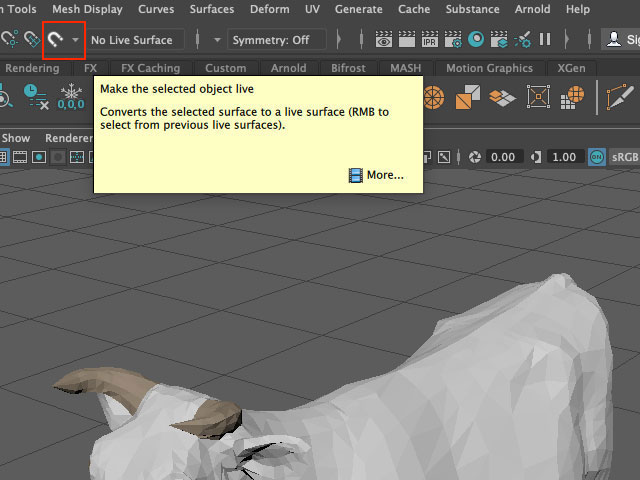
      • Make the selected object live: Select object > Right click > Make live


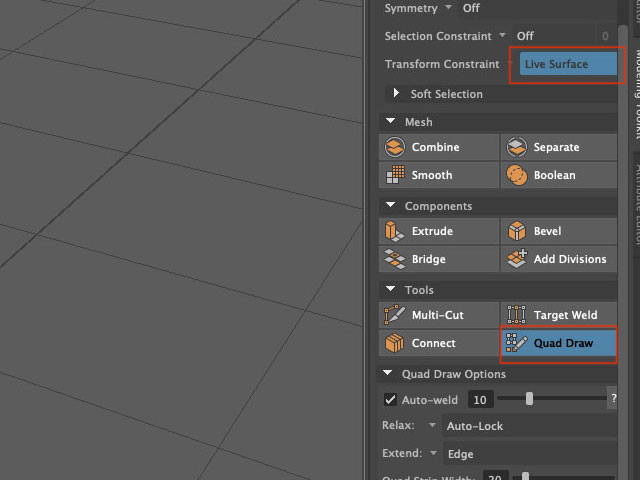
      • Modeling Toolkit > Quad Draw


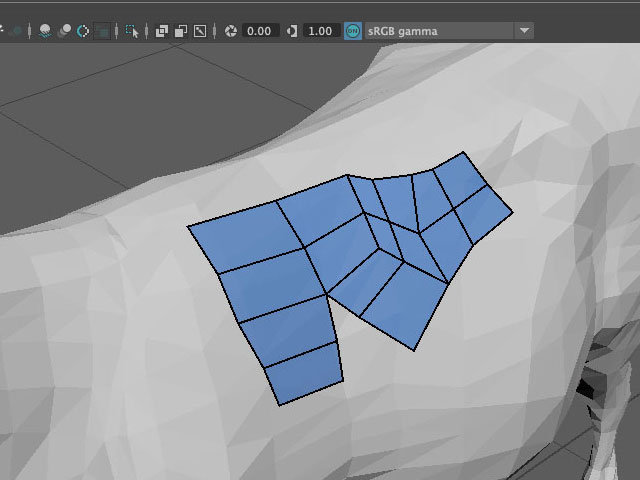
    • You can also model in a natural and organic way using Quad Draw Tool, which offers a streamlined, one-tool workflow for retopologizing meshes. The manual retopology process lets you create clean meshes while preserving the shape of your reference surface.

      The following table lists the default hotkeys for the Quad Draw tool.

    Operations Hotkeys

    Drop dots

    LMB + Click the reference surface

    Generate faces Shift + LMB
    Delete components Ctrl + Shift + LMB

    Tweak components

    MMB or LMB+ rub across the surface

    Relax components

    Shift + LMB

    Relax a selection of vertices Shift + MMB (rub across all points)

    Insert an edge loop

    Ctrl + LMB

    Remove an edge loop

    Ctrl + Shift + LMB

    Extend an edge

    Tab + LMB

    Extend an edge loop

    Tab + MMB